
The "You Are What You Eat" Customer Segmentation
In this project, I use k-means clustering to segment the customer base in order to increase business understanding, and to enhance the relevancy of targeted messaging and customer communications.
Table of contents
Project Overview
Context
The Senior Management team from the client, a supermarket chain, is disagreeing about how customers are shopping and how lifestyle choices may affect which food areas customers are shopping in, or more interestingly, not shopping in.
Their proposal is to use data and Machine Learning to help segment up their customers based upon their engagement with each of the major food categories. This will aid their business understanding of the customer base and enhance the relevancy of targeted messaging and customer communication.
Actions
The first step is to compile the necessary data from sevaral tables in the database, namely the transactions table and the product_areas table. To do this, I join together the relevant information using Pandas, and then aggregate the transactional data across product areas from the most recent six months to a customer level. The final data for clustering is, for each customer, the percentage of sales allocated to each product area.
A good starting point is to test and apply k-means clustering for this task. This will require some data pre-processing, most importantly, feature scaling to ensure all variables exist on the same scale, a very important consideration for distance based algorithms such as k-means.
As k-means is an unsupervised learning approach, meaning there are no labels, a process known as Within Cluster Sum of Squares (WCSS) can be used to understand what a “good” number of clusters or segments is.
Based upon this, the k-means algorithm can be applied onto the product area data. Then the clusters can be appended to the customer base. And then profile the resulting customer segments to understand what the differentiating factors were!
Results
Based upon iterative testing using WCSS, 3 clusters looks to be a good customer segmentation. These clusters ranged in size, with Cluster 0 accounting for 73.6% of the customer base, Cluster 2 accounting for 14.6%, and Cluster 1 accounting for 11.8%.
There were some extremely interesting findings from profiling the clusters.
For Cluster 0, a significant portion of spend is being allocated to each of the product areas; showing customers without any particular dietary preference.
For Cluster 1, a high proportion of spend being allocated to Fruit and Vegetables, but very little to the Dairy and Meat product areas. It could be hypothesized that these customers are following a vegan diet.
Finally, customers in Cluster 2 spent significant portions within Dairy, Fruit and Vegetables, but very little in the Meat product area. So similarly, we would make an early hypothesis that these customers are more along the lines of those following a vegetarian diet.
To help embed this segmentation into the business, I have proposed to call this the “You Are What You Eat” segmentation.
Growth/Next Steps
It would be interesting to run this clustering/segmentation at a lower level of product areas, so rather than just the four areas of Meat, Dairy, Fruit, Vegetables - clustering spend across the sub-categories below those categories. This would mean creating more specific clusters, and getting an even more granular understanding of dietary preferences within the customer base.
It could also be interesting to include customer metrics such as distance to store, gender, etc to give a even more well-rounded customer segmentation.
Lastly, other clustering approaches such as hierarchical clustering or DBSCAN can be used and their results compared.
Github Repo
View the Github Repo here: Customer Loyalty Github Repo
Data Overview
The primary goal is to discover segments of customers based upon their transactions within food based product areas so only the food based columsn will be kept.
In the code below, we:
- Import the required python packages & libraries
- Import the tables from the database
- Merge the tables to tag on product_area_name which only exists in the product_areas table
- Drop the non-food categories
- Aggregate the sales data for each product area, at customer level
- Pivot the data to get it into the right format for clustering
- Change the values from raw dollars, into a percentage of spend for each customer (to ensure each customer is comparable)
# import required packages
import pandas as pd
import numpy as np
from sklearn.cluster import KMeans
from sklearn.preprocessing import MinMaxScaler
import matplotlib.pyplot as plt

# load the data
transactions = pd.read_excel('../data/ABC_Grocery_Data/grocery_database.xlsx', sheet_name='transactions')
product_areas = pd.read_excel('../data/ABC_Grocery_Data/grocery_database.xlsx', sheet_name='product_areas')

# concat the dataframes
df = pd.merge(transactions, product_areas, how='inner', on='product_area_id')

# drop any non-food categories
df = df[df['product_area_name'] != 'Non-Food']

# aggregate the data
df_summary = df.groupby(['customer_id', 'product_area_name'])['sales_cost'].sum().reset_index()

# use pivot table
df_pivot = df.pivot_table(index='customer_id',
                                    columns='product_area_name',
                                    values='sales_cost',
                                    aggfunc='sum',
                                    fill_value=0,
                                    margins=True,
                                    margins_name='Total').rename_axis(None, axis=1)


# get percentage of sales for each product area
data_for_cluster = df_pivot.div(df_pivot['Total'], axis=0).drop('Total', axis=1)
After the data pre-processing using Pandas, the dataset for clustering that looks like the below sample:
| customer_id | dairy | fruit | meat | vegetables |
|---|---|---|---|---|
| 2 | 0.246 | 0.198 | 0.394 | 0.162 |
| 3 | 0.142 | 0.233 | 0.528 | 0.097 |
| 4 | 0.341 | 0.245 | 0.272 | 0.142 |
| 5 | 0.213 | 0.250 | 0.430 | 0.107 |
| 6 | 0.180 | 0.178 | 0.546 | 0.095 |
| 7 | 0.000 | 0.517 | 0.000 | 0.483 |
The data is at customer level, and there is a column for each of the highest level food product areas. Within each of those there is a percentage of sales that each customer allocated to that product area over the past six months.
K-Means
Concept Overview
K-Means is an unsupervised learning algorithm, meaning that it does not look to predict known labels or values, but instead looks to isolate patterns within unlabeled data.
The algorithm works in a way where it partitions data-points into distinct groups (clusters) based upon their similarity to each other.
This similarity is most often the eucliedean (straight-line) distance between data-points in n-dimensional space. Each variable that is included lies on one of the dimensions in space.
The number of distinct groups (clusters) is determined by the value that is set for “k”.
The algorithm does this by iterating over four key steps, namely:
- It selects “k” random points in space (these points are known as centroids)
- It then assigns each of the data points to the nearest centroid (based upon euclidean distance)
- It then repositions the centroids to the mean dimension values of it’s cluster
- It then reassigns each data-point to the nearest centroid
Steps 3 & 4 continue to iterate until no data-points are reassigned to a closer centroid.
Data Preprocessing
There are three vital preprocessing steps for k-means, namely:
- Missing values in the data
- The effect of outliers
- Feature Scaling
Missing Values
Missing values can cause issues for k-means, as the algorithm won’t know where to plot those data-points along the dimension where the value is not present. If the supermaket dataset has observations with missing values, the most common options are to either remove the observations, or to use an imputer to fill-in or to estimate what those value might be.
As the data for each customer is aggregated, there aren’t missing values and that issue does not need to be dealt with.
Outliers
As k-means is a distance based algorithm, outliers can cause major problems. The main issue is that when the input variables are scaled, a very important step for a distance based algorithm, outliers can cause variables can be “bunched up”, making it hard to compare their values with other input variables.
Feature Scaling
Again, as k-means is a distance based algorithm, in other words it is reliant on an understanding of how similar or different data points are across different dimensions in n-dimensional space, the application of Feature Scaling is extremely important.
Feature Scaling forces the values from different columns to exist on the same scale, in order to enchance the learning capabilities of the model. There are two common approaches for this, Standardization, and Normalization.
Standardization rescales data to have a mean of 0, and a standard deviation of 1, meaning most datapoints will most often fall between values of around -4 and +4.
Normalization rescales datapoints so that they exist in a range between 0 and 1.
For k-means clustering, either approach is going to be far better than using no scaling at all. For this project, I will look to apply normalization as this will ensure all variables will end up having the same range, fixed between 0 and 1. Therefore the k-means algorithm can judge each variable in the same context. Standardization can result in different ranges, variable to variable, and this is not so useful (although this isn’t explcitly true in all scenarios).
Another reason for choosing Normalization over Standardization is that the scaled data will all exist between 0 and 1, and these will then be compatible with any categorical variables that is encoded as 1’s and 0’s (although there aren’t any variables of this type in this dataset).
In our specific task here, percentages are used, so the values are already spread between 0 and 1. Normalization will still be applied for the following reason. One of the product areas might commonly make up a large proportion of customer sales, and this may end up dominating the clustering space. Once all the variables are normalized, even product areas that make up smaller volumes will be spread proportionately between 0 and 1!
The below code uses the in-built inMaxScaler functionality from scikit-learn to apply Normalization to all of the variables. The reason to create a new object (here called data_for_clustering_scaled) is to use the scaled data for clustering, but when profiling the clusters later on, I will want to use the actual percentages as this may make more intuitive business sense. So it’s good to have both options available!
# scale the data
scale_norm = MinMaxScaler()
data_for_cluster_scaled = scale_norm.fit_transform(data_for_cluster)
data_for_cluster_scaled = pd.DataFrame(data_for_cluster_scaled, columns=data_for_cluster.columns)
Finding A Good Value For k
At this point here, the data is ready to be fed into the k-means clustering algorithm. Before that however, it is important to understand what number of clusters to split data into.
In the world of unsupervised learning, there is no right or wrong value for this - it really depends on the data you are dealing with, as well as the unique scenario you’re utilising the algorithm for. From the client, having a very high number of clusters might not be appropriate as it would be too hard for the business to understand the nuance of each in a way where they can apply the right strategies.
Finding the “right” value for k, can feel more like art than science, but there are some data driven approaches that can be used.
The approach to be utilized here is known as Within Cluster Sum of Squares (WCSS) which measures the sum of the squared euclidean distances that data points lie from their closest centroid. WCSS can help to understand the point where adding more clusters provides little extra benefit in terms of separating the data.
By default, the k-means algorithm within scikit-learn will use k = 8, meaning that it will look to split the data into eight distinct clusters. There may a better value that fits our data, and our task!
In the code below I test multiple values for k, and plot how this WCSS metric changes. As the value for k increases (in other words, as we increase the number or centroids or clusters), the WCSS value will always decrease. However, the decreases will get smaller and smaller each time another centroid is added. The point where this decrease is quite prominent before this point of diminishing returns is the desired number for k.
# use wcss to find the optimal number of clusters
wcss = []
k_list = list(range(1, 11))

for k in k_list:
    kmeans = KMeans(n_clusters=k, random_state=42)
    kmeans.fit(data_for_cluster_scaled)
    wcss.append(kmeans.inertia_)

# plot the elbow method
plt.plot(k_list, wcss)
plt.title('Within Cluster Sum of Squares - K Means')
plt.xlabel('K Clusters')
plt.ylabel('WCSS Score')
plt.tight_layout()
plt.show()
That code gives the plot below, which can be used to choose k.
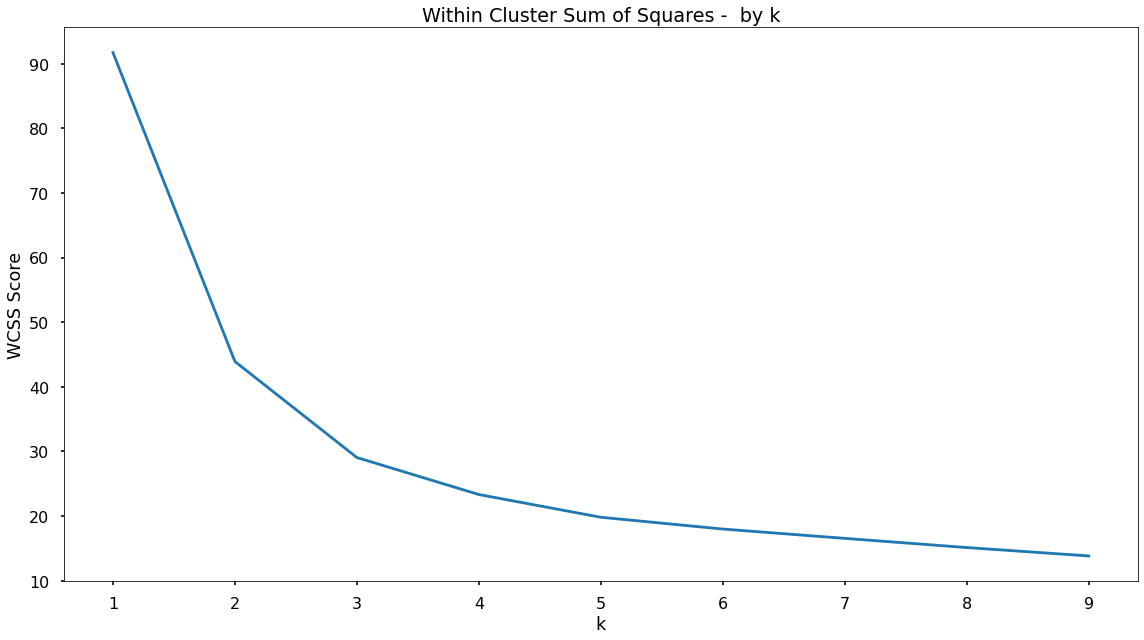
Based upon the shape of the above plot - there does appear to be an elbow at k = 3. Prior to that, there is a significant drop in the WCSS score, but following k = 3 the decreases are much smaller. This could be a point that suggests adding more clusters will provide little extra benefit in terms of separating the data. A small number of clusters can be beneficial when considering how easy it is for the business to focus on, and understand. So k = 3 will be used to fit the k-means clustering solution.
Model Fitting
The below code will instantiate the k-means object using a value for k equal to 3. Then it will fit this k-means object to the scaled dataset to separate the data into three distinct segments or clusters.
# instantiate the model and fit using k = 3
kmeans = KMeans(n_clusters=3, random_state=42)
kmeans.fit(data_for_cluster_scaled)
Append Clusters To Customers
With the k-means algorithm fitted to the data, those clusters can be appened to the original dataset, meaning that each customer will be tagged with the cluster number that they most closely fit into based upon their sales data over each product area.
In the code below, the cluster number is combined to the original dataframe.
# add the cluster labels to the original data
data_for_cluster['cluster'] = kmeans.labels_
Cluster Profiling
Once the data is separated into distinct clusters, the client needs to understand what it is that is driving the separation. This means the business can understand the customers within each cluster and the behaviours that make them unique.
Cluster Sizes
In the below code, the number of customers that fall into each cluster is assessed.
# view cluster sizes
data_for_cluster["cluster"].value_counts(normalize=True)
Running that code shows that the three clusters are different in size, with the following proportions:
- Cluster 0: 73.6% of customers
- Cluster 2: 14.6% of customers
- Cluster 1: 11.8% of customers
Based on these results, it does appear that there is a skew toward Cluster 0 with Cluster 1 & Cluster 2 being proportionally smaller. This isn’t right or wrong, it is simply showing up pockets of the customer base that are exhibiting different behaviours, and this is a great insight.
Cluster Attributes
To understand what these different behaviours or characteristics are, analyze the attributes of each cluster in terms of the variables that are fed into the k-means algorithm.
# profile clusters
cluster_profile = data_for_cluster.groupby('cluster')[['Dairy', 'Fruit', 'Meat', 'Vegetables']].mean().reset_index()
That code results in the following table…
| Cluster | Dairy | Fruit | Meat | Vegetables |
|---|---|---|---|---|
| 0 | 22.1% | 26.5% | 37.7% | 13.8% |
| 1 | 0.2% | 63.8% | 0.4% | 35.6% |
| 2 | 36.4% | 39.4% | 2.9% | 21.3% |
For Cluster 0 there is a reasonably significant portion of spend being allocated to each of the product areas. For Cluster 1 there is quite a high proportion of spend being allocated to Fruit and Vegetables, but very little to the Dairy and Meat product areas. It could be hypothesized that these customers are following a vegan diet. Finally, customers in Cluster 2 spend, on average, significant portions within Dairy, Fruit and Vegetables, but very little in the Meat product area - so similarly, an early hypothesis is that these customers are more along the lines of those following a vegetarian diet, very interesting!
Application
Even those this is a simple solution, based upon high level product areas it will help leaders at the company, and category managers gain a clearer understanding of the customer base.
Tracking these clusters over time would allow the client to more quickly react to dietary trends, and adjust their messaging and inventory accordingly.
Based upon these clusters, the client will be able to target customers more accurately, promoting products and discounts to customers that are truly relevant to them, overall enabling a more customer focused communication strategy.
Growth & Next Steps
It would be interesting to run this clustering/segmentation at a lower level of product areas, so rather than just the four areas of Meat, Dairy, Fruit, Vegetables - clustering spend across the sub-categories below those categories. This would mean creating more specific clusters, and getting an even more granular understanding of dietary preferences within the customer base.
It could also be interesting to include customer metrics such as distance to store, gender etc to give a even more well-rounded customer segmentation.
Lastly, other clustering approaches such as hierarchical clustering or DBSCAN can be used and their results compared.